Pixels, units, and coordinate frames
Make image, camera, target, and world coordinates explicit before solving.
Step 1 of 4 · The idea
In this lesson
What you'll learn
- Annotate a pipeline with frame names, axis directions, units, and transformations.
- Trace one target point from metric board coordinates to an image pixel.
- Diagnose a scale or frame-direction error from its numerical consequences.
Key idea
Name every frame and unit
Calibration is easier when every number has a home. Image points live in pixel coordinates. Board points live in the calibration target frame. Pose estimates move between the board frame and the camera frame. A robot may add another world frame. The same physical corner can be described in all of these frames, but the numeric values will not match.
The most common early mistakes are not advanced math mistakes. They are unit and frame mistakes. Confusing meters with millimeters introduces a factor-of-1,000 error in translation scale. An arbitrarily scrambled point array makes the solver fit the wrong correspondences. A resized image used with the original camera matrix shifts every projection.
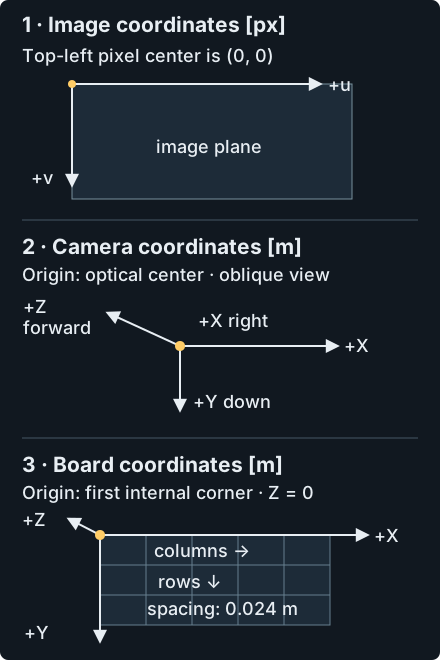
Image coordinates start at the top-left pixel center: u increases right and v increases down. In the OpenCV camera frame, +X points right, +Y down, and +Z forward into the scene; camera coordinates use meters here. Board coordinates start at the first internal corner in the chosen ordering. +X follows columns, +Y follows rows, and +Z completes a right-handed frame. The 9 by 6 board lies at Z = 0 and uses 0.024 m spacing.
Together, rotation and translation map board coordinates into camera coordinates: Xc = R @ Xb + t. Only then do you divide by camera depth and map to pixels. See array shapes and homogeneous division. A consistent whole-board symmetry can change the per-view pose without changing single-camera intrinsics. An arbitrary scrambled permutation breaks correspondence. Stereo pairs and a fixed world origin require the same physical corner identity.
See it in practice
Example
Use R = I, t = (0, 0, 2) m, fx = fy = 800 px and principal point (640, 360) px with zero distortion. Board point (0.144, 0.072, 0) m becomes camera point (0.144, 0.072, 2) m. Divide by 2 to get normalized ray (0.072, 0.036); the image point is (697.6, 388.8) px. The board point, camera point and pixel are different descriptions of one corner.
Common mistakes
- Writing square size in millimeters but reading translation as meters.
- Swapping the order of rows and columns in the checkerboard pattern.
- Mixing original-frame pixels with resized-frame pixels.
- Using variable names such as point1 and point2 instead of names that include frame and unit.
When things go wrong
Diagnose the problem
A robot cell reports that a detected part is ten meters away even though the camera is mounted half a meter above the table. The image detection is correct, and OpenCV returns a pose. The error comes from a unit mismatch: board points were entered in millimeters, but the robot-side code interpreted the translation vector as meters.
Add units to the data model before changing any scale factors. Object points should include their physical unit. Image points should include the processed image size. Pass pose outputs downstream in the same unit used for square size. This makes the code longer, but it removes guesswork.
What to check
- Print the first object point and first image point before solving.
- Check that pattern size means the same thing in object-point generation and detection.
- Confirm the processed image size before using K.
- Name variables with frame and unit suffixes when they cross system boundaries.
Predict before revealing: A board translation is recorded in millimeters while its point coordinates are in meters. What must change before adding them?
Compare your reasoning
Convert both to the same unit and confirm the same frame. A numerically valid array addition can otherwise place the board a thousand times too far away.
Build and test
Python lab
Your investigation
Run your corrected to_camera on both input poses. Download the result JSON and compare the first and last points in board and camera. Which quantities change with pose, and which distances stay fixed? Diagnose what the original translation-only function leaves out.
Build five points spaced in meters, then transform them from board to camera coordinates.
Try it
Apply what you learned
Interpret your results
Both poses use the same board and 0.024 m square spacing. Which coordinates changed, and which point-to-point distances stayed fixed? Explain the missing rotation in the starter using the board-to-camera direction.
Transfer check: A second script interprets the same t = (0, 0, 2) as millimeters. How far away does it think the board is? What should change?
Check your reasoning
It thinks the board is 0.002 m away, a factor of 1,000 too close. Fix the unit contract or convert explicitly. Do not multiply unrelated image coordinates by 1,000.
Compare your results
Both poses use five points at 24 mm spacing, from (0,0,0) to (0.096,0,0) m in the board frame. The board origin maps to t, so it alone cannot reveal a missing rotation. The other four points expose that error. For row-vector arrays, points @ R.T + t applies the same rigid transform as R @ point + t for a column vector. Rotation preserves the 0.024 m adjacent distances while changing the row’s direction.
Before you move on
Check your understanding
- You can generate object points with the declared metric spacing.
- You can apply a board-to-camera rotation and translation consistently.
- You can use a non-origin point and a preserved distance to check a transform.
Run your Python on the supplied inputs and pass its computational checks. Inspect the result and its limits, then mark the lesson complete.